Excel wire list in.
Harness diagram out. Under a minute.

Tractus turns your wire list into a production-ready harness drawing package, without changing the tools or the process your team already uses. We set up your Excel template with you during onboarding.
Start your trial Runs on your machine. Your harness data stays local.
Xwire_list.xlsxA7
ABCDE
1WIREFROMTOGASIGNAL
2W1001J1-3J2-324CAN_H
3W1002J1-4J2-424CAN_L
4W1003J1-1J2-120PWR_28V
5W1004J1-2J2-220GND
6W1005J1-8J2-5225V
7W1006J1-9J2-722RTN_A
+ 5 more circuits
READINGParsing wire_list.xlsx · 11 circuits
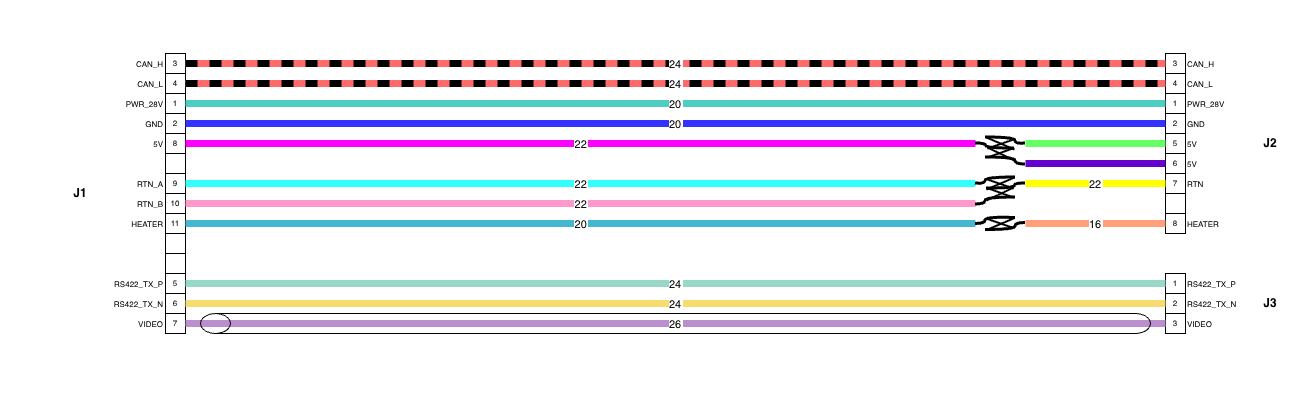
Tractus output: TR-1001-001 wiring diagram, J1–J3 circuits
TR-1001-001 · SHEET 2 OF 4

Sound familiar?

01

Several hours, by hand. Your harness engineer draws diagrams manually — every single harness, every revision.

02

Errors surface at final assembly. By then, rework costs a week — and someone has to explain it to the customer.

03

$6,000–$13,000 per seat, per year. Enterprise tools demand a full database migration. Excel is still faster.

Three steps. No new process.

01

Start from your Tractus template

We build it from your existing wire list during onboarding, so it matches your columns and your process.

02

Fill it in, drop it on the app

Work in the spreadsheet like always, then drag the file onto Tractus. No new database, no CAD.

03

Generate the package

A complete harness drawing package in under a minute, every time, every revision.

Built for how aerospace teams actually work.

F-01

Stay in Excel

No new database and no CAD. You keep working in a spreadsheet, and we convert your wire list into the Tractus template during onboarding.

F-02

Editable draw.io output

Your drawing comes back as a draw.io file you can open and edit, not a locked PDF.

F-03

Built for controlled data

Generation runs entirely on your machine, which suits ITAR and other controlled-data work. Nothing about your harnesses is uploaded on its own; the only automatic call is an update check.

F-04

Design check before every drawing

An advisory check runs automatically: pin and signal conflicts, missing or invalid gauges, missing lengths, and connectors wired but not placed. Custom standards rules like AS50881 can be added.

F-05

Handles complex connections

Splices, twisted and shielded pairs, and overbraid shields are drawn as distinct, standards-based symbols with drain and ground detail.

F-06

Batch your whole backlog

Point it at a folder of wire lists and get a complete documentation package for each one.

What's included.

ITEMDESCRIPTIONSTATUS
01Wire-list setup
During onboarding we convert your existing wire list into the Tractus Excel template and tune the parser to your column names. Your team keeps working in a spreadsheet.
INCLUDED
02Automatic drawing package
Wire list in, a complete four-sheet package out in under a minute: cover and BOM, point-to-point wiring, reference legend, and a details sheet with wire-length callouts and 3D connector views matched to your BOM. Pins and signals labeled, wires color-coded, splices and shields drawn. Editable .drawio you open in free draw.io and export to PDF or PNG.
INCLUDED
03Design check before every drawing
An advisory check runs automatically before each drawing and never blocks you. It flags pin and signal conflicts, missing or invalid wire gauges, missing or orphaned lengths, connectors wired but not placed (and the reverse), self-connected wires, blank title-block fields, and BOM parts missing an image or weight. Custom standards rules like AS50881 can be scoped and added.
INCLUDED
04Weight & bundle-size report
Total harness weight from a datasheet-based library (SAE AS22759 and more) plus connector and hardware weights, and an estimated bundle diameter for conduit and clamp sizing. Exported as a standalone Excel file.
INCLUDED
05Procurement BOM
Wire footage aggregated by gauge with a cutting-waste allowance, plus connector and hardware part numbers and quantities, in a standalone Excel file your purchasing team can use directly.
INCLUDED
06Company drawing template
Your title block, CAGE code, revision block, and logo on every sheet, so the package looks like your standard drawing.
INCLUDED
07Batch mode
Process your whole backlog in one session: a folder of wire lists in, a documentation package per harness out, with design-check warnings summarized at the end.
INCLUDED
08Onboarding session
One hour on a video call: column mapping on your actual wire list, your first run reviewed together, and your branding and any custom rules configured.
INCLUDED
09Training & self-serve help
A recorded walkthrough and written quick-start, plus a built-in guided tour, a one-click sample package, and plain-language help on every option, so anyone on your team can run it on day one.
INCLUDED
10Configuration you own
Your template, branding, rules, and connector library, delivered as portable files. The app runs on your machines indefinitely.
INCLUDED
1130-day support window
Email and live video calls after delivery, bookable inside the app. Bugs fixed, edge cases handled. Monthly retainer available after for re-runs and new modules.
30 DAYS

Start your free trial.

Tractus gets set up for your shop, so it isn't a plain download. We map it to your wire-list format, add your title block and CAGE code, and hand you a license key for the 14-day trial.

Drop your email and I'll reach out to get you running, usually within a business day. Nothing to install until we've set it up together.

Built for aerospace teams. Please use your work email.

Request your trial

I'll reply within one business day. Your details are only used to set up your trial.